iDefender Team version transforms professional-grade endpoint security protection into a standardized capability that teams can manage and enforce uniformly.
Key Features
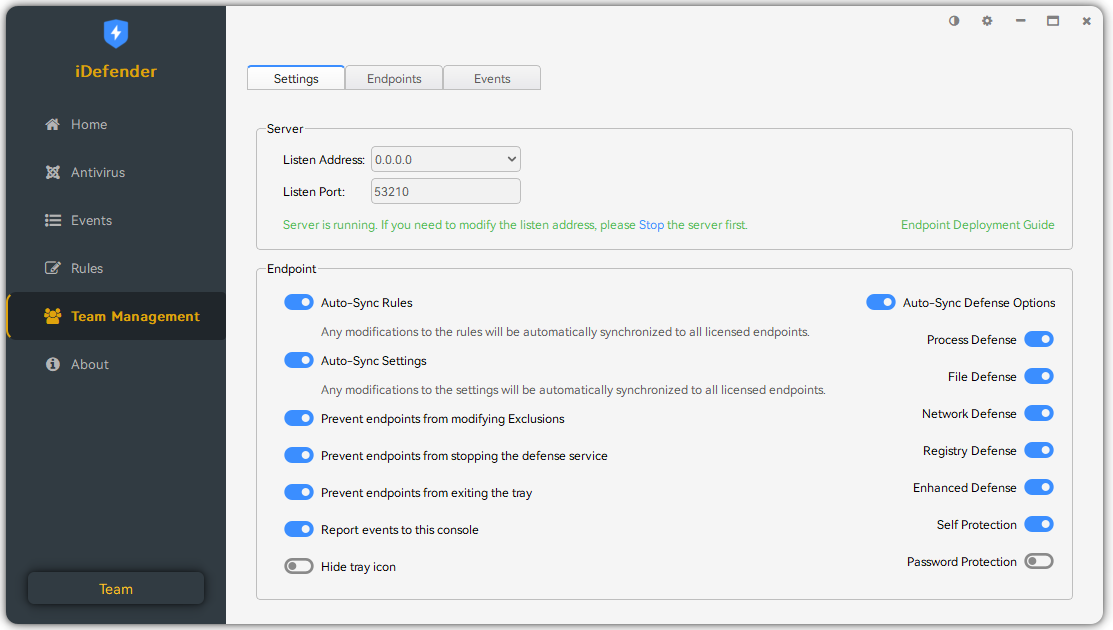
Through the Team Management page, you can batch and real-time distribute and update endpoint rules and settings, as well as centrally view and analyze events from all endpoints. This greatly improves operational efficiency and reduces the costs of repetitive setup and maintenance.
Deployment Guide
Management Console Deployment
Download the team version and install it normally. The management console supports deployment on Windows 10 or Windows Server 2019 and later operating systems.
After installation, set the network address and port on the Team Management page that other endpoints can access normally. If there is a firewall, remember to configure it in advance to allow the port.
Endpoint Deployment
Rename the downloaded team version installer to the format iDefenderTeam(ip_port).exe, where IP and Port are the network address and port set by the management console, for example, iDefenderTeam(192.168.1.100_53210).exe. If the network address is set to 0.0.0.0, then use ipconfig to find the IP address within the same network range as other endpoints - do not use 0.0.0.0.
After successfully renaming, copy it to the endpoint and install normally. For silent installation, add the /S command line parameter.
Download
| Version | 5.2.2 |
| Management Console | Windows 10, 11, Windows Server 2019, 2022 (64-bit) |
| Endpoint | Windows 7 SP1, 8, 8.1, 10, 11 (32 & 64-bit) |
| Server | Windows Server 2012, 2016, 2019, 2022 (32 & 64-bit) |
Purchase
Please read the activation guide and FAQ of Pro version before purchasing.
If you have any questions during purchase or activation, please email support@trustsing.com for assistance.
Activation Guide
For activation issues and license usage, please refer to the Pro version's Activation Guide.